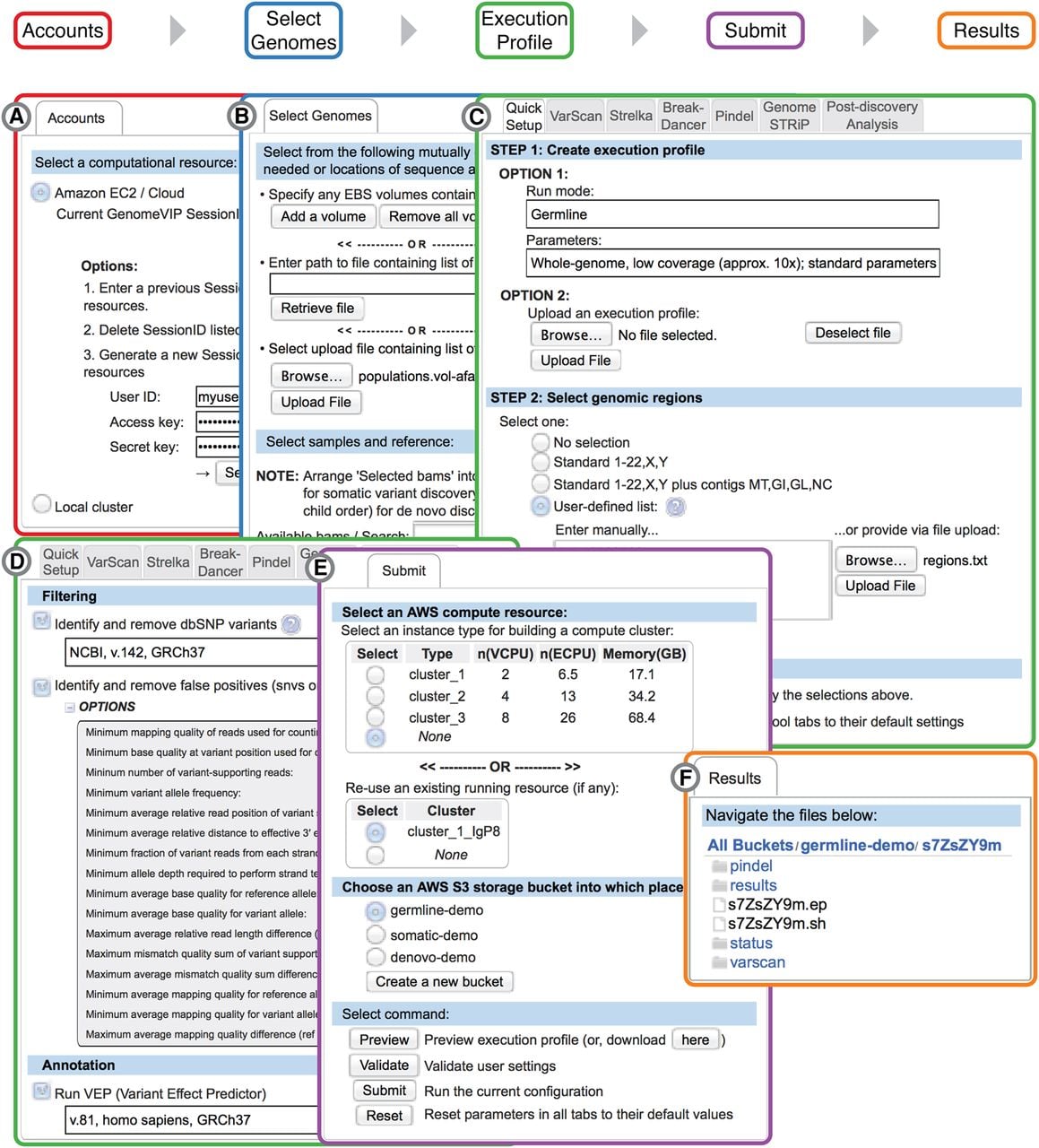
GenomeVIP screenshots. (A) Accounts. Presentation of the user's valid Amazon Web Services causes GenomeVIP to generate a semipersistent sessionID used to store or recall previous cloud resource configurations. (B) Select Genomes. A user-uploaded file listing sequence alignment, reference, and index files is parsed and displayed for item selection. (C) Quick Setup tab configuration for loading a built-in execution profile with predefined tools and parameters (Step 1, option 1); a profile may alternatively be uploaded via the interface (Step 1, option 2). Predefined genomic regions may be selected or uploaded via the interface (Step 2). Clicking the Apply Profile button (Step 3) configures tools listed under the other tabs (gray) with the current predefined profile and regions, which may be subsequently modified manually under the other tabs. (D) Post-discovery Analysis. Selection of filters and annotation as part of the execution profile, showing the expanded false-positives filter panel (gray) for customization. (E) Submit. Resource management options are provided to create new or reuse existing computing instances and cloud storage location. Buttons to preview, download, or error-check the current execution profile, or to submit it as a computation, are available. (F) Results. An Amazon cloud storage file listing showing folders for tools’ outputs, job status, and results. Files .sh and .ep represent the master script describing the computation's workflow and the execution profile, respectively.